
“Who the *** changed the plan?!”
Pretty realistic for a typical morning on a construction site, isn’t it?
A crew shows up ready to work and finds out the plan changed somewhere up in the office, but the information didn’t make it to the field in time.
Almost every superintendent, foreman, or project manager has said it, heard it, or dealt with the fallout. It’s almost a running joke on job sites, except it’s not funny when a crew arrives at a space that isn’t ready, a subcontractor is working from yesterday’s information, or a change reaches the field after materials have already been ordered.
Construction teams rarely struggle because they don’t communicate. They struggle because important information doesn’t reliably turn into action.
Chanty is a communication and coordination tool that works alongside the software a construction company already uses. It helps updates reach the right people, connects decisions to follow-up, and gives the office visibility without getting in the field’s way. Not another project management system, and not another stream of notifications. More like the right screwdriver for the job.
Why construction communication is different
Construction runs on sequence and coordination: foundation before framing, rough-in before drywall, inspection before the next phase. When an important update gets stuck between the office and the job site, the consequences reach far beyond one missed message.
Teams communicate constantly through calls, texts, radios, email, group chats, and morning huddles. The problem is what happens after the communication. A schedule change gets mentioned, but the people affected don’t see it. A field issue gets reported, but nobody is clearly responsible for following up. A decision gets made on site, but later someone has to figure out what was actually agreed.
When the people who need the information aren’t in the same place
Construction communication has a unique problem: the people making decisions and the people carrying them out are often working in completely different places, under completely different conditions.
Office teams spend much of their day thinking in documentation and project status: RFIs, submittals, change orders, daily logs, permits, punch lists, schedules, approvals, and project records. They need to know what happened, what changed, what is still open, and who owns the next step.
Field teams are dealing with a different reality. Their attention is usually on what needs to happen next, whether the area is ready, whether materials are on site, who is supposed to arrive, what is holding up the work, and what changed since the last update. A foreman may be moving between crews, a superintendent may be walking the site, and a worker may be in the middle of a task or safety briefing. Stopping to search through a long message or write a detailed update isn’t always practical.
Because the two sides rarely have the luxury of walking over and talking, information travels through other people. That creates a familiar chain:
The office makes a change → Someone passes it to the field → Someone else passes it to the crew → Someone assumes everyone has been told → The crew starts working from different information.
It’s basically the construction version of the broken telephone. Except the result isn’t a misunderstood sentence. It can be a crew waiting, a delivery arriving too early, another trade getting blocked, or work having to be redone. And because construction is tightly connected by sequence, one delay can affect several trades downstream. The work keeps moving while the information tries to catch up.
Field communication doesn’t need to look like office communication
A skilled electrician, concrete finisher, HVAC technician, or equipment operator was hired for a trade, not to write project reports on a phone. So a field-friendly communication tool should fit how people actually work:
- Short updates: “Done.” “Inspector’s here.” “Truck’s delayed 30 minutes.”
- Photos instead of paragraphs: A picture of a site condition can explain the situation faster than a written description.
- Voice messages: Useful when a foreman needs to explain a developing situation without stopping to type.
- Clear follow-up: If an update requires action, it should be easy to turn the conversation into an assigned next step.
- Notifications they control: Not every message needs to interrupt the work. Routine discussion should wait until a crew member has a free moment, while urgent issues should still get through.
The goal isn’t to make construction workers communicate more. It’s to make important communication easier to see, understand, and act on without getting in the way of the work.
When a communication gap becomes a project problem
A missed message in an office environment might mean someone replies later than expected. On a construction site, the consequences can be very different.
| What gets missed | What it can turn into |
| A subcontractor isn’t told about a schedule change | A crew arrives before the site is ready, or another trade is left waiting |
| A field condition isn’t communicated to the project team | Work continues based on information that is no longer accurate |
| A safety concern is reported but follow-up isn’t clearly assigned | The issue remains unresolved or gets lost among other priorities |
| A change is discussed verbally but isn’t properly recorded in the relevant workflow | A later disagreement over scope, cost, or schedule |
| An inspection issue isn’t clearly assigned | The correction or reinspection can become another source of delay |
| A material delivery changes | Crews have to wait, reschedule, or rearrange work |
Notice that these aren’t necessarily failures where nobody communicated. In many cases, someone did. The information just never became an owned action.
How to turn construction crew communication into coordinated work?
Construction teams already have plenty of ways to exchange information. The harder part is connecting that information to what happens next.
A useful way to think about the gap is:
conversation → decision → task → owner → deadline → status
Take a simple example. A foreman reports that a delivery is running late. The project manager understands the problem, someone contacts the supplier, another trade may need to be rescheduled, and the updated plan needs to reach the people affected. Later, someone still needs to confirm that the issue was resolved.
If the update stays buried in a conversation, the team has to remember all those steps. If it becomes an assigned action with an owner and status, the follow-up is easier to see.
That’s the difference between communication and coordination. Communication makes sure information is exchanged. Coordination makes sure the right people know what happens next and who is responsible for it.
For construction leaders, that distinction can affect project visibility, schedule management, accountability, and the time PMs and superintendents spend chasing updates.
Where does a communication layer fit with existing construction software?
Most construction companies don’t need another system to replace everything they already use. A commercial contractor may already have software for project management, scheduling, drawings, RFIs, submittals, estimating, accounting, and document management. The question is what happens around those systems.
A schedule may live in a project management platform, but the reason for changing tomorrow’s sequence might first come up in a phone call. A formal change-order workflow may exist, but the conversation leading to the change may happen between a superintendent and subcontractor on site. A project manager may have a dashboard showing formal project information and still need to call three people to find out whether a field issue was resolved.
That gap is the communication layer. It sits between formal systems and everyday conversations that keep the job moving. It needs to be simple enough to use during the workday, but structured enough that important decisions and follow-ups don’t disappear into someone’s phone or memory.
For management, the value isn’t seeing more messages. It’s operational visibility. A project executive doesn’t need to read every conversation across five active jobs. They need to know where work is blocked, which issues are still open, who owns the follow-up, and whether important decisions have reached the people who need to act.
Using Chanty for construction crews
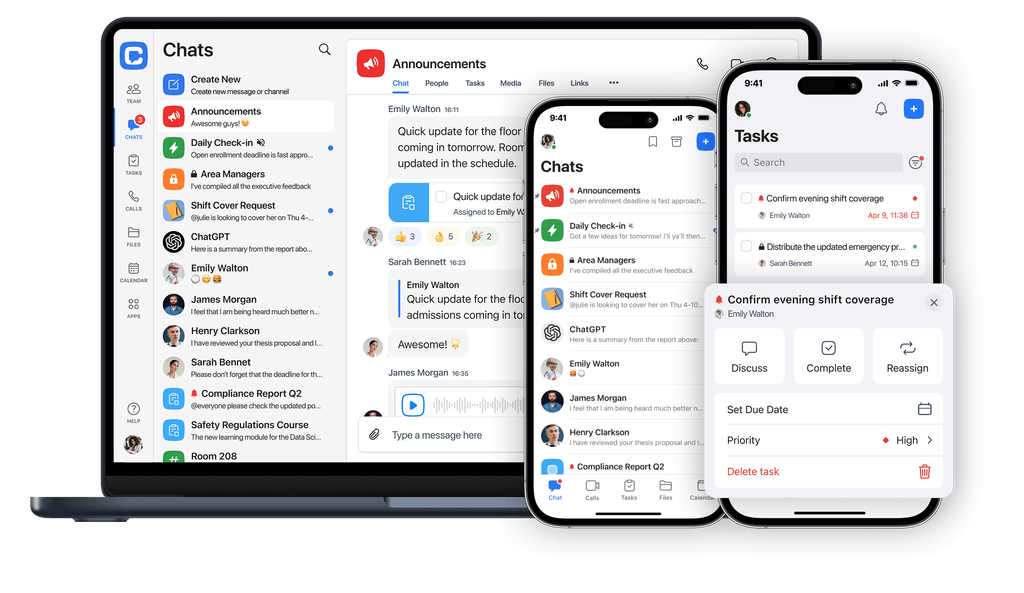
Chanty isn’t a construction management platform for drawings, estimating, scheduling, or formal project records, and it doesn’t need to be. Formal records stay where the company already keeps them. Chanty handles the everyday conversations, updates, and follow-ups around that work:
- Project-based channels keep conversations organized around specific jobs, teams, or functions.
- Voice messages give field teams another way to communicate when typing isn’t practical.
- Message history and search make it easy to check what was said and agreed.
- Tasks created from messages turn an important update into an assigned action with an owner, deadline, and status.
- Notification controls let each person choose which channels can interrupt them, so field crews get alerts only from essential channels and check routine discussion when they’re ready.
- Message editing and deletion controls let teams lock specific channels so messages can’t be changed or removed, preserving a reliable record where it matters.
- Guest access and permissions keep subcontractors and outside partners in the conversations relevant to their work.
- Scheduled messages and reminders help teams send routine updates without relying on someone to remember.
- Integrations connect Chanty with the tools teams already use, including
Why not just use a regular messenger?
Group chats and general-purpose messengers are fast, and crews already know them from daily life. What they lack is structure. Messages pile up in one stream, follow-ups depend on someone remembering, outside partners are hard to add and remove cleanly, and a decision from three weeks ago is hard to find. Chanty keeps the speed of chat and adds the pieces coordination needs: project channels, tasks with visible owners, searchable history, and controlled access.
Practical construction use cases
Coordinating a schedule change
A subcontractor is scheduled to start Tuesday. On Monday afternoon, another trade discovers that the area won’t be ready. The affected subcontractor needs to know, the project manager needs visibility, and someone needs to confirm the revised plan.
In a group text, the update may be easy to send but harder to track later. In a Chanty project channel, the people involved can see the update, while a follow-up task gives someone ownership of the next step. A schedule change becomes an action rather than another detail someone has to remember.
Following up on a field issue
A crew discovers an unexpected site condition. The first message might be as simple as:
“We found an issue with the wall. Need PM to take a look before we continue.”
That’s perfectly reasonable field communication. The problem comes afterward. Who is responding? When does it need to be resolved? Has the decision made it back to the crew? The important part of the conversation can become a Chanty task, giving the project team a clear owner and follow-up.
For formal safety incidents, inspections, or compliance records, the appropriate safety or project-management system should remain the system of record. Chanty supports the communication and follow-up around those processes.
Keeping notifications quiet while crews work
A phone buzzes, and a worker starts digging through a pocket to check it, while holding a nail gun, standing on a ladder, or running equipment, all to end up with a thread about lunch orders. Most messages on a busy project aren’t urgent. The interruption is the problem.
With Chanty, frontline workers can turn on notifications only for the channels that are essential, such as the crew’s urgent-issues channel or direct messages from their foreman. General project discussion and day-to-day chatter stay quiet until they choose to open it.
This doesn’t replace site safety rules or company phone policies. It removes one everyday reason to reach for the phone at the wrong moment, so workers stay reachable for what matters and undisturbed for what doesn’t.
Keeping subcontractors coordinated
A commercial GC may have electrical, plumbing, HVAC, framing, drywall, and other trades working through the same physical space. When one trade runs behind, the impact can extend well beyond that trade. A project channel gives the relevant people a shared place for the immediate update. A task can capture whatever follow-up needs an owner.
Instead of:
“Did anyone tell HVAC?”
the team can move toward:
“HVAC has been notified. John owns the reschedule. New start time is Wednesday at 8.”
The difference is small, but the second version makes the next step and its owner much clearer.
Keeping a reliable record of field decisions
Many scope, cost, and schedule disputes come down to one question: what was actually agreed, and when? On a job site, the answer often lives in a text thread where messages can be edited, deleted, or lost when someone changes phones.
For channels where the record matters, like change discussions or subcontractor agreements, Chanty can restrict editing and deleting messages. What was written stays as written, with its timestamp and author, giving teams a clearer trail when a decision needs to be reconstructed.
This doesn’t replace formal change orders or contracts, which stay in the company’s system of record. Teams with specific legal or record-retention requirements should confirm their needs with their own counsel.
Coordinating crews across multiple job sites
A specialty contractor may have crews on several sites in the same week. For an operations manager, the challenge isn’t simply talking to each crew. It’s knowing what’s happening without personally calling every foreman.
Consistent channel structures organize communication by project and give operations teams a familiar way to check updates across jobs. The goal isn’t to create another reporting burden for foremen. It’s to make routine updates easier to share and important follow-up easier to see.
Communicating with a multilingual workforce
Construction teams can be linguistically diverse, particularly across subcontractors and frontline crews, which makes simple communication even more important. Short updates, photos, voice messages, clear channels, and straightforward task assignments can be easier to adopt than workflows built around lengthy forms and constant data entry.
For larger contractors, the question isn’t only whether a tool has the right features. It’s whether people working in different roles, locations, and languages will actually use it.
How does the challenge differ by type of construction company?
The workflows differ, but the underlying challenge is the same: keeping people working from the same information when teams and projects are spread across different places.
| Construction setting | Where coordination gets difficult | Who may feel the problem most |
| General contractors on large commercial builds | Multiple trades, overlapping schedules, subcontractor dependencies, constant field changes | Project executives, PMs, superintendents |
| Residential builders and remodelers | Small teams balancing field work, client communication, permitting, and scheduling | Owners, operations managers, project managers |
| Specialty trade contractors | Crews moving between jobs while coordinating materials, schedules, and site access | Operations managers, foremen, dispatchers |
| Multi-site contractors | Several active projects with different teams, schedules, and subcontractors | Directors of operations and construction |
| Civil and infrastructure projects | Distributed teams, inspections, safety requirements, permitting, and long timelines | Project managers, safety leaders, operations teams |
What construction leaders should look for in a communication tool
When evaluating a construction communication platform, ask:
- Can field teams use it without much friction? If sending an update takes longer than calling someone, adoption suffers.
- Can each person control their own notifications? If every message buzzes every phone, workers either tune everything out or check constantly.
- Can people find important information later? Searchable history reduces the need to reconstruct events from memory.
- Can conversations become accountable actions? Turning a message into a task closes the gap between “someone mentioned it” and “someone owns it.”
- Can access follow the project? Subcontractors join and leave projects, and outside partners only need access to relevant work.
- Can it preserve a reliable record where needed? For change discussions or subcontractor agreements, look for controls that prevent messages from being edited or deleted.
- Can it work alongside the existing construction stack? It should complement your systems of record, not become another isolated silo.
What coordinated construction work looks like
The goal isn’t to add more messages to an already noisy job site. It’s to reduce the amount of information people have to remember, chase, repeat, and reconstruct.
A project manager shouldn’t have to call five people to find out whether an issue is still open. A foreman shouldn’t have to search through three weeks of messages to find out what was agreed. A superintendent shouldn’t have to remember which subcontractor was told about a schedule change.
Construction will always involve schedule changes, safety questions, delivery updates, field conditions, inspections, subcontractor coordination, and last-minute decisions. The communication itself isn’t going away.What changes is what happens to it afterward: information reaches the people who need it, decisions become actions, follow-ups have clear owners, and the answer to “what happened with a plan three days ago?” doesn’t depend on who happens to remember.
Ready to try it with your crew? Start with a Chanty demo today.